
This article will show you how to receive deliveries in the Middleware System.
This article is for the operations department, store personnel, and store heads.
If you experience a discrepancy, contact your immediate head and wait for instructions.
TABLE OF CONTENTS
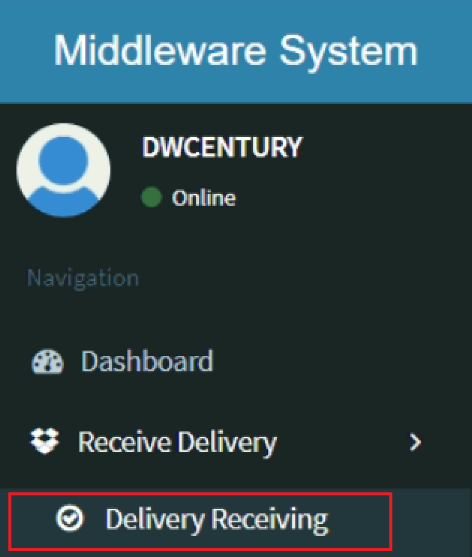
- Step 1: Click on Delivery Receiving
- Step 2: Search for the DR
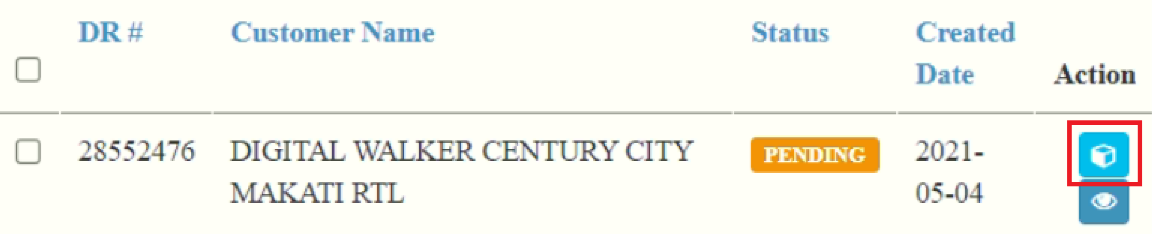
- Step 3: Click on Receive Icon
- Step 4: Scan Items
- Step 5: Click on Receive Button
Step 1: Click on Delivery Receiving
Step 2: Search for the DR

Input your DR number in the search bar and click ENTER
Step 3: Click on Receive Icon
Step 4: Scan Items

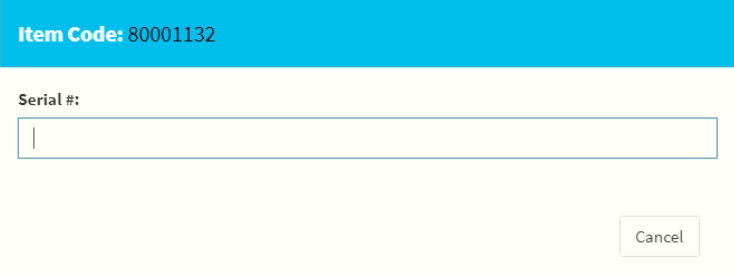
If your item is serialized, a popup window will appear. Scan your serial here.
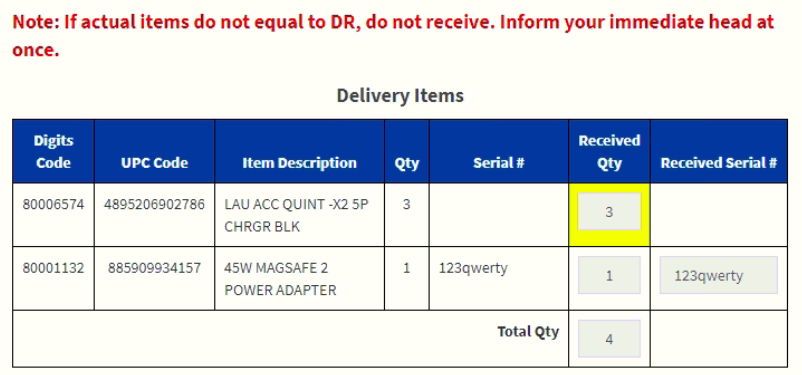
Your most recently scanned item will appear in yellow to assist you in the receiving process.
Step 5: Click on Receive Button

If there are no problems and discrepancies, a success message will appear.
If you experience a discrepancy, contact your immediate head and wait for instructions.