
The purpose of this policy is to outline the rules and temporary process of the company during declarations of ECQ, Enhanced Community Quarantine, due to reduction in manpower and closure of retail stores and malls.
TABLE OF CONTENTS
Roles and Responsibilities
- Logistics
- Logistics driver will accompany the pullout team
- Assists in loading and unloading of boxes
- Retail Head / Retail Operations
- Visits stores to check items for pullout
- Secures mall permits
- Collates all ST# and emails it the to the SDM department
- SDM
- Creates BEACH SOR transaction based on ST#
- Receives BEACH SOR transaction
- Store Head
- Prepares items for pullout
- Creates POS ST
- Provides Retail Operations with a list of ST# for pullout
- Warehouse
- Receives pullout items in WRF
- WSDM
- Extracts item details from ST# list provided by Audit
- Receives POS ST transaction (TRANSIT to WAREHOUSE)
Policy- During ECQ, the MPS system will not be utilized to accommodate the reduction in manpower. To keep inventory transfers documented, the POS and BEACH will be still be used.
- To expedite the pullout process, the NO MATCH NO PULLOUT policy will currently be on hold for the duration of the ECQ, only in so far as the process where Logistics inspects and matches the items individually based on the pullout form. Under no circumstance can the Store Head allow the pullout of items with discrepancies.
- Schedule of Pull-out and Mall Requirements (Permits, Outfits, ID, etc....) will be discussed by the Retail Head / Retail Operations Manager at least day before the pull-out.
- Store Head will create POS stock transfers [GOOD to TRANSIT (POSTED) + TRANSIT to WAREHOUSE(PENDING)], and scan all items that will be pulled out through the POS. If the stock transfer produces errors, then the item cannot be physically pulled out due to possible pending MPS transactions.
- To make inventory reconciliation easier, Store Head will create 1 ST per box.
- After creating the POS Stock Transfers, the Store Head will email all the ST# created to the Retail Operations team.
- After the Retail Operations team collates all ST# created, they will email the list to the SDM department.
- After all ST transactions are posted successfully, boxes can be sealed.
- The store head will pack the item in advanced to make operations more efficient.
- After SDM receives the list of ST#, SDM will create the BEA SOR. WSDM can assist with extraction of item details from POS.
- All BEA transactions will be created to the DTO Org first. Shortcuts will not be accommodated in the BEACH system.
- Warehouse will create the WRF after receiving the items and ST Form from Logistics.
- Once Warehouse has finished receiving, WSDM will receive the transaction in BEACH and POS.
Process Flow
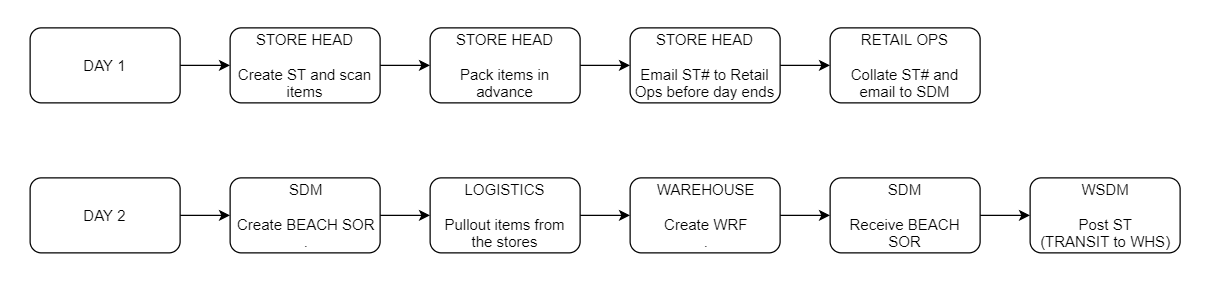
Systems Used
SYSTEM | STATUS |
| BEACH | LIVE |
| POS | LIVE |
| MPS | STOP |