
The purpose of this policy is to outline the rules and regulations of the company pertaining to deliveries from the Digits warehouse to the store location or distribution client.
TABLE OF CONTENTS
- Purpose
- Roles and Responsibilities
- Systems Used
- Policy
- Process (Overview)
- Process (Detailed)
- Contingency Plan
Roles and Responsibilities- Accounting
- Match signed DR, Beach, POS, and Middleware transactions.
- Close outright and consignment transactions in BEACH.
- ECOM Ops
- Updates FBD inventory.
- Monitors FBV inventory.
- Closes FBD and FBV transactions in the Middleware.
- Store Personnel
- Matches DR and deliveries alongside the delivery specialist.
- Signs DR after physical receiving of deliveries.
- Scans all items to the Middleware.
- Logistics
- Dispatches items to the store.
- Turnover signed DR to the Accounting team.
- Warehouse
- Pick and Pack items based on picklist requirement.
- Returns accomplished picklist to the WSDM department
- Turnover DR and items to the Logistics department.
- Delivery Specialist
- Delivers items from the warehouse to the store
- Matches DR and deliveries alongside the delivery specialist
- SDM
- Creates MO / SO transactions in BEACH.
- WSDM
- Creates picklist from BEACH.
- Pick confirm transactions in BEACH.
- Prints DR in BEACH.
- Match signed DR, Beach, POS, and Middleware transactions.
- Close outright and consignment transactions in BEACH.
- Updates FBD inventory.
- Monitors FBV inventory.
- Closes FBD and FBV transactions in the Middleware.
- Matches DR and deliveries alongside the delivery specialist.
- Signs DR after physical receiving of deliveries.
- Scans all items to the Middleware.
- Dispatches items to the store.
- Turnover signed DR to the Accounting team.
- Pick and Pack items based on picklist requirement.
- Returns accomplished picklist to the WSDM department
- Turnover DR and items to the Logistics department.
- Delivers items from the warehouse to the store
- Matches DR and deliveries alongside the delivery specialist
- Creates MO / SO transactions in BEACH.
- Creates picklist from BEACH.
- Pick confirm transactions in BEACH.
- Prints DR in BEACH.
Systems Used
| CHANNEL | BEACH | MIDDLEWARE | POS |
| CONSIGNMENT | ✔ | X | X |
| ECOM | ✔ | ✔ | X |
| FRANCHISE | ✔ | ✔ | X |
| OUTRIGHT | ✔ | X | X |
| RETAIL | ✔ | ✔ | X |
| SERVICE CENTER | ✔ | ✔ | X |
Policy- The Middleware system is built to connect the BEACH and POS to reduce redundant functions and optimize manpower efficiency for the delivery process.
- Warehouse to ECOM FBD transactions will now be using BEACH's Move Order transactions instead of SIT.
- The ECOM, Franchise, Retail, and Service Center store operations will use the Middleware to receive warehouse deliveries. The POS will no longer be used due to stock adjustment and stock transfer transactions being automated.
- All warehouse to store deliveries must be created through the BEACH.
- All warehouse to store deliveries require a BEACH DR before it can be dispatched from the warehouse.
The only exception to this rule are ECOM FBD sales transactions from warehouse to the direct consumer, where the warranty slip from the DEM system is used instead. - There is a 2-part process when receiving items in the Retail and Franchise stores. Part 1 involves physical receiving and matching of items by the delivery specialist and the store personnel. Part 2 involves scanning each item into the Middleware.
- Users must receive the DR transaction in the Middleware within 24 hours from receiving the physical deliveries.
- All Retail and Franchise stores must scan their deliveries in the Middleware. Users may only input items manually if their scanners are not working.
- If a discrepancy is encountered, the transaction must not be received. Users must contact their immediate head for further instructions on backload.
- Items that have not yet been scanned in the Middleware for receiving may not be sold.
- ECOM transactions may only be received in the Middleware after the inventory has reflected in the seller center.
- Consignment and outright transactions will still be received by Accounting in the BEACH.
- Accounting will match signed DR received, BEACH, Middleware, and POS.
The only exception to this rule are ECOM FBD sales transactions from warehouse to the direct consumer, where the warranty slip from the DEM system is used instead.
Process Flow (Overview)
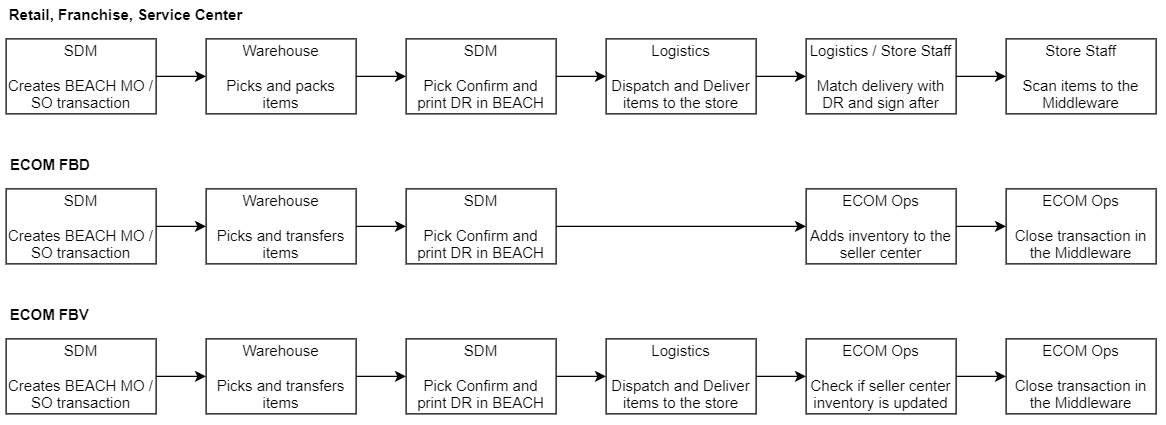
You may view each scenario's detailed process flow below.
Process Flow (Detailed)
[01] Warehouse to Retail / Franchise / Service Center
| STEP | C/O | PROCESS |
1 | SDM | Create a BEACH SO / MO transaction. |
2 | WSDM | Create and turnover picklist to the Warehouse team. |
3 | Warehouse | Pick and Pack items. Turnover the accomplished picklist to the WSDM team. |
4 | WSDM | Pick Confirm and Print DR in BEACH. Turnover the DR to the Warehouse team. |
5 | Warehouse | Turnover DR and packed goods to the Logistics team. |
6 | Logistics | Dispatch items from the warehouse with DR and Trip Ticket. |
7 | Delivery Specialist | Deliver / Turnover items and DR to the store personnel. Shadow the store personnel during the receiving process. |
8 | Store Personnel | Match DR and physical items received. Sign DR and return a copy to the Delivery Specialist. Scan all items to the Middleware. |
9 | Logistics | Turnover signed DR to the Accounting team. |
[02] Warehouse to ECOM FBD
| STEP | C/O | PROCESS |
1 | SDM | Create a BEACH MO transaction. |
2 | WSDM | Create and turnover picklist to the Warehouse team. |
3 | Warehouse | Pick and turnover items to the ECOM Warehouse team. Turnover the accomplished picklist to the WSDM team. |
4 | WSDM | Pick Confirm and Print DR in BEACH. |
5 | ECOM WHS | Store items in the correct rack. |
6 | ECOM Ops | Open the Middleware transaction and manually add the items to the seller center. |
7 | ECOM Ops | Close Middleware transaction. |
[03] Warehouse to ECOM FBV
| STEP | C/O | PROCESS |
1 | SDM | Create a BEACH MO transaction. |
2 | WSDM | Create and turnover picklist to the Warehouse team. |
3 | Warehouse | Pick and Pack items. Turnover the accomplished picklist to the WSDM team. |
4 | WSDM | Pick Confirm and Print DR in BEACH. Turnover the DR to the Warehouse team. |
5 | Warehouse | Turnover DR and packed goods to the Logistics team. |
6 | Logistics | Dispatch items from the warehouse with DR and Trip Ticket. |
7 | Delivery Specialist | Deliver / Turnover items to the vendor. |
8 | Logistics | Turnover signed DR to the Accounting team. |
9 | ECOM Ops | Check FBV inventory if it has reflected. Input IO# and close the Middleware transaction afterwards. |
Contingency Plan
There are 6 possible scenarios that will require a system adjustment or inventory reconciliation.
- SO is created, but not yet pick confirmed
- SDM to cancel SO
- MO is created, but not yet pick confirmed
- SDM to cancel MO
- MO is created and pick confirmed
- Inventory Control to receive DOT in BEACH
- Inventory Control create Inventory Adjustment in BEACH (Miscellaneous Out in DOO and Miscellaneous IN in DTO
- BPG to close transaction in Middleware
- SO is created and pick confirmed
- SDM to create SOR in BEACH
- BPG to close transaction in Middleware
- Store Personnel wrongly receives Middleware transaction (MO)
- Inventory Control to create POS Stock Transfer (Store to Warehouse) and Stock Adjustment Out
- SDM to create and receive MOR in BEACH
- Store Personnel wrongly receives Middleware transaction (SO)
- Inventory Control to create POS Stock Transfer (Store to Warehouse) and Stock Adjustment Out
- SDM to create and receive SOR in BEACH