
The purpose of this document is to teach Digits users on how to create POS Replacement transactions. This will be used to remove inventory when conducting replacement items to the customer.
TABLE OF CONTENTS
Roles and Responsibilities- Store Personnel
- Creates negative/positive POS invoice
- Creates POS Stock Adjustment - REPLACEMENT
- Inputs negative/positive invoice number and replacement adjustment number to the DAS
- Accounting
- Posts all REPLACEMENT stock adjustment transactions in the POS every 10am in the morning
- Ensures that DAS information matches is correct
- Creates negative/positive POS invoice
- Creates POS Stock Adjustment - REPLACEMENT
- Inputs negative/positive invoice number and replacement adjustment number to the DAS
- Posts all REPLACEMENT stock adjustment transactions in the POS every 10am in the morning
- Ensures that DAS information matches is correct
Policy- All trade items, whether it was serialized or not, will use the POS replacement process.
- When issuing a replacement item to the customer, the store personnel will create a negative/positive invoice in the POS. Store personnel will input the old invoice# and store of where the defective item was bought in the memo portion. This invoice will be given to the customer as the releasing document.
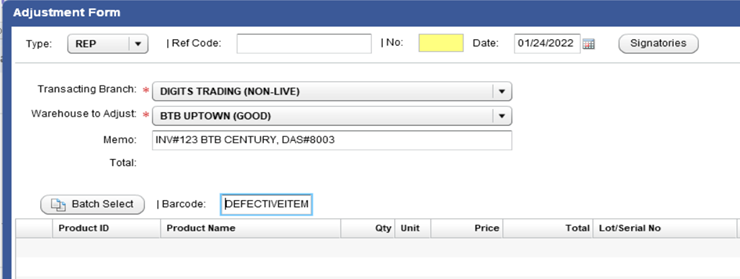
- Due to the created negative/positive invoice created, the inventory returned must be removed from the POS. To do this, the store personnel will create a POS Stock Adjustment (REP - REPLACEMENT) on the same day. They will indicate the defective item’s information in the POS. Users need to input the following info:
- Type: REP
- Warehouse to Adjust: Your store’s good warehouse
- Memo: Old Invoice# and Store bought, DAS#
- Item: The defective item returned by the customer
- The store personnel will input the negative/positive invoice number and REP adjustment number to the DAS to close the transaction.
- When the Accounting department sees an invoice with a positive and negative transaction, they will only transact BEACH SO for the positive quantity. Negative quantity will be ignored because it will be transacted normally as SOR by the RMA department. Please see DAS process for details on the aftersales return process (replacement action plans).
- The Accounting department will post all REP Stock adjustment transactions every working day, 10am in the morning. They will also check that the information in the DAS matches the POS adjustment and negative/positive invoice
- Type: REP
- Warehouse to Adjust: Your store’s good warehouse
- Memo: Old Invoice# and Store bought, DAS#
- Item: The defective item returned by the customer