This article will teach you how to create batching items.
This article is applicable to the Chefs.
TABLE OF CONTENTS
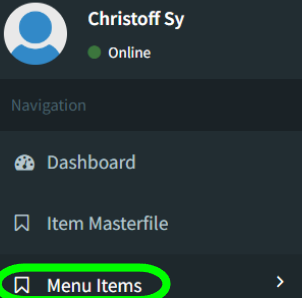
- Step 1: Click on Menu Items
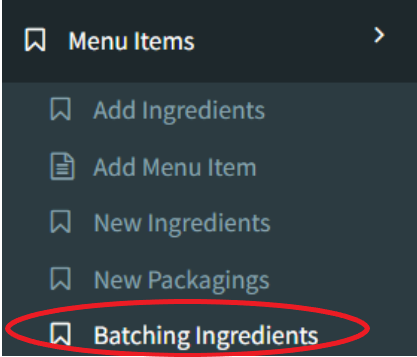
- Step 2: Click on Batching Ingredients
- Step 3: Click on Add Data
- Step 4: Input New Batching Ingredient
- Step 5: Input Ingredients
- Step 6: Input Ingredient Details
- Step 7: Click Save
Step 1: Click on Menu Items
Step 2: Click on Batching Ingredients
Step 3: Click on Add Data

Step 4: Input New Batching Ingredient

Step 5: Input Ingredients

Click on Add Existing Ingredient when using existing ones, batching items, or other menu items
Click on Add New Ingredient when using new ones. Please refer to the Add New Ingredient Page for information on how to add New Ingredients.
Step 6: Input Ingredient Details
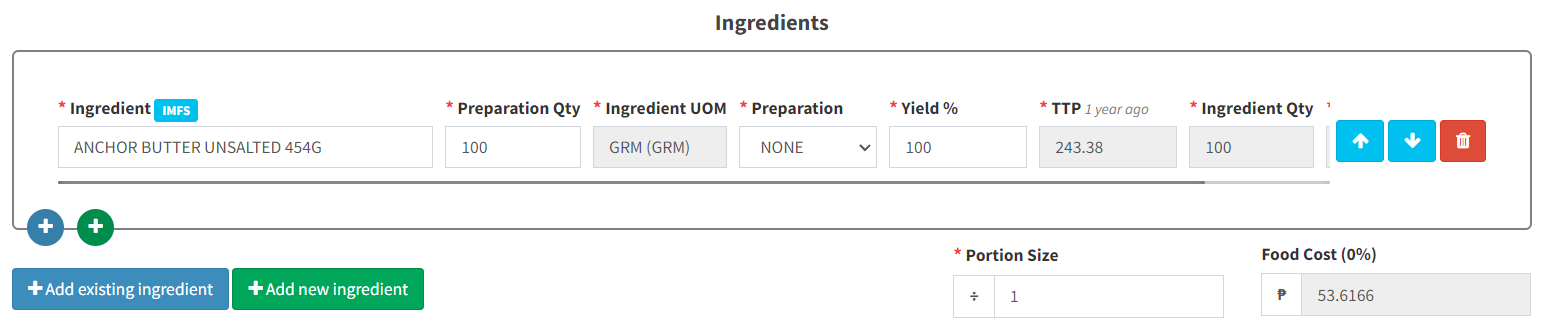
Preparation Qty = Quantity of Ingredient
Ingredient UOM = Unit of Measure
Preparation = How the Ingredient is prepared or cooked
Yield % = How much of the actual ingredient is usable after preparation
TTP = Tasteless Price
Ingredient Qty = How much of the ingredient is needed to be procured based on actual yield
Portion Size = How many people this is good for