
The purpose of this policy is to outline the rules and regulations of the company pertaining to aftersales transactions. The scope of this policy includes the Retail, Franchise, and ECOM groups. It establishes the requirement to utilize the appropriate systems for handling returns based on whether the item has been sold or remains unsold.
TABLE OF CONTENTS
- Purpose
- Roles and Responsibilities
- Accepted Warranty Reasons
- RMA Action Plans
- Repairable Brands
- Policy
- Process Flow
- Difference of MW and DAS
- Definition of Terms
Roles and Responsibilities- ECOM Aftersales
- Verifies the transaction in the online store (Lazada, Shopee)
- Identifies the correct Customer Location (FBV / FBD) in DAS
- Contacts customer and performs initial diagnosis through chat
- Generates weekly reports for all pending ECOM transactions
- Closes repair and rejected transactions in DAS after the customer receives their item
- Ensures that all ECOM transactions are completed within 30-45 days
- Together with Operations Aftersales, they co-manage the Store Ops Group Chat
- ECOM Logistics
- Coordinates with customer and 3rd party courier for Door-to-Door Pickup
- Schedules 3rd party pickup date in DAS
- Operations Aftersales
- Generates weekly reports for all pending RETAIL transactions
- Assist store personnel in locating replacement items
- Ensures that all RETAIL transactions are completed within 30-45 days
- Together with ECOM Aftersales, they co-manage the Store Ops Group Chat
- Logistics
- Schedules pickup date in DAS
- Pullout items from the store
- Deliver repaired or rejected items back to the store
- Store Operations
- Receives items that are dropped off in store
- Performs initial diagnosis of items
- Locates replacement items from their store, or other stores. If items are not available, create MRS request.
- Transacts negative invoice / new invoice in POS for replacement items.
- Ensures that Return Forms are signed by the customer before returning REPAIRED / REJECTED items.
- Messages the DAS Reference Number to the group chat after turning over items to the customer.
- RMA / Service Center
- Performs diagnosis of defective items
- Assigns action plans for defective items
- Prints Return Form and coordinates with Logistics for delivery
- Creates and Receives BEA SOR
- Inputs BEA SOR# in DAS after receiving
- Accounting
- Prints CRF - Customer Return Form
- Uploads Proof of Refund in Google Drive
- Refunds customer for defective items
- Closes refund transactions in DAS
- Inventory Control
- Performs Inventory Adjustment in POS
- Closes replacement transactions in POS
- Verifies the transaction in the online store (Lazada, Shopee)
- Identifies the correct Customer Location (FBV / FBD) in DAS
- Contacts customer and performs initial diagnosis through chat
- Generates weekly reports for all pending ECOM transactions
- Closes repair and rejected transactions in DAS after the customer receives their item
- Ensures that all ECOM transactions are completed within 30-45 days
- Together with Operations Aftersales, they co-manage the Store Ops Group Chat
- Coordinates with customer and 3rd party courier for Door-to-Door Pickup
- Schedules 3rd party pickup date in DAS
- Generates weekly reports for all pending RETAIL transactions
- Assist store personnel in locating replacement items
- Ensures that all RETAIL transactions are completed within 30-45 days
- Together with ECOM Aftersales, they co-manage the Store Ops Group Chat
- Schedules pickup date in DAS
- Pullout items from the store
- Deliver repaired or rejected items back to the store
- Receives items that are dropped off in store
- Performs initial diagnosis of items
- Locates replacement items from their store, or other stores. If items are not available, create MRS request.
- Transacts negative invoice / new invoice in POS for replacement items.
- Ensures that Return Forms are signed by the customer before returning REPAIRED / REJECTED items.
- Messages the DAS Reference Number to the group chat after turning over items to the customer.
- Performs diagnosis of defective items
- Assigns action plans for defective items
- Prints Return Form and coordinates with Logistics for delivery
- Creates and Receives BEA SOR
- Inputs BEA SOR# in DAS after receiving
- Prints CRF - Customer Return Form
- Uploads Proof of Refund in Google Drive
- Refunds customer for defective items
- Closes refund transactions in DAS
- Performs Inventory Adjustment in POS
- Closes replacement transactions in POS
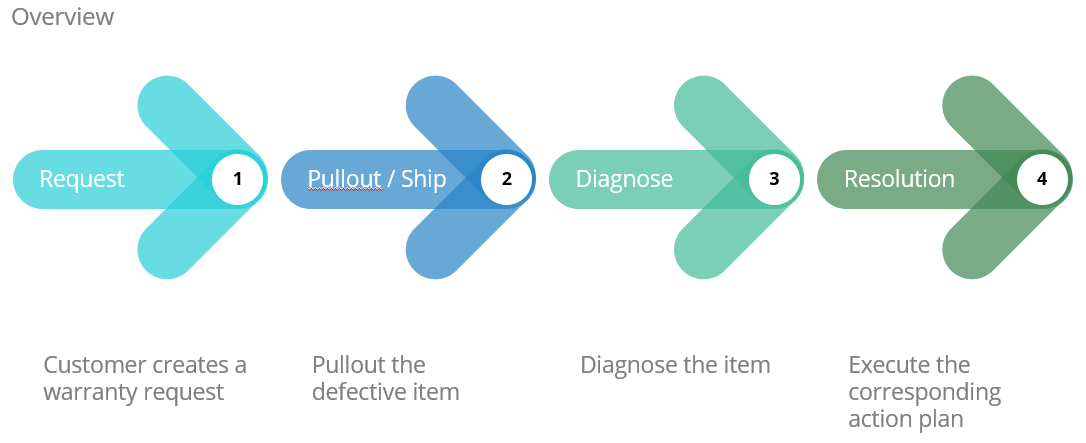
Policy- Customers must create warranty requests through the link: https://www.warranty.digits.com.ph
- There are two systems in use when processing defective item returns depending on the type of transaction.
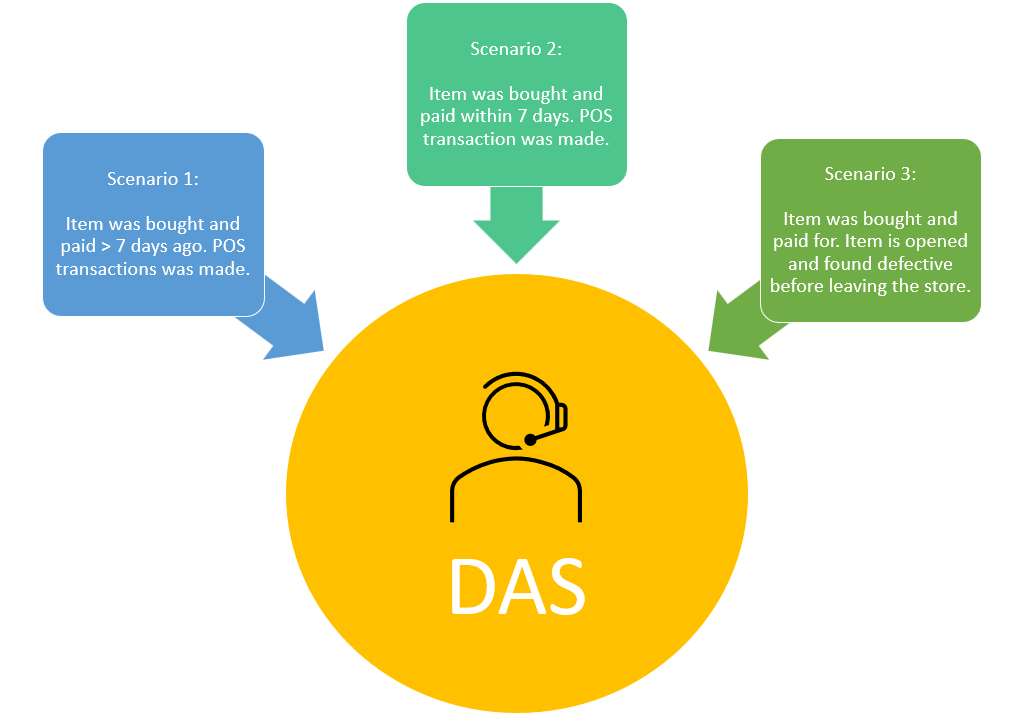
- DAS - Digits Aftersales System
- Items processed here have been bought and paid for by the customer
- Sale has been issued by a valid POS receipt from affiliated stores
- Customer has unsealed and opened the item
- Timeframe of the warranty starts the second the sale has been made
- If any of the criteria this sub-section has been met, then the DAS will be used
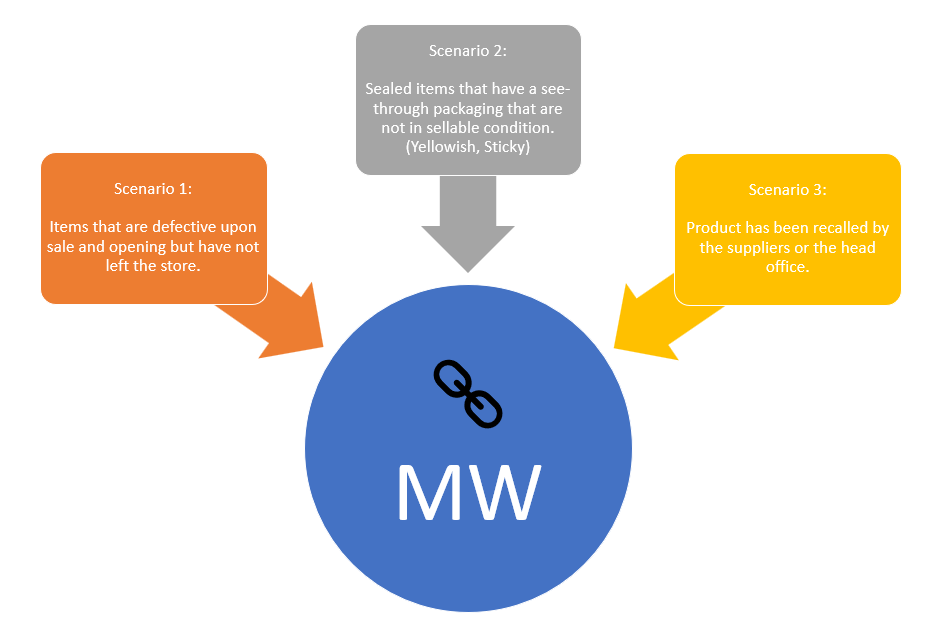
- MW - Middleware
- Sealed items that have damaged packaging that any customer refuses to purchase
- Sealed items that have a see through packaging that are not in sellable condition (Eg. Yellowish, Sticky)
- Product has been recalled by the head office
- Product has been recalled by the supplier
- If any of the criteria in this sub-section has been met, then the MW will be used
- Bypassing of DAS through soft-swapping of the defective item and a good item is strictly prohibited. This constitutes as manipulation of transaction and is subject to sanctions.
- Transactions that are not performed using the DAS is grounds for sanction, with the exception of Lightroom brands.
- If a defective product is opened in front of a customer and has not yet left the store, the item must be voided in the POS and returned through the Middleware. DAS will not be used for cases like this.
- Customers seeking to return a sold item must present a valid proof of purchase, such as a receipt or invoice.
- Upon receipt of a customer return request, employees responsible for processing returns should verify the validity of the proof of purchase.
- The DAS System will generate a return reference number, which will be provided to the customer. This number will serve as a reference for tracking and monitoring the progress of the return.
- All in-warranty items can be replaced instantly in the store if returned within 7 days from purchase. This is applicable only to ECOM, RETAIL, and FRANCHISE stores.
- Out-of-warranty products that are REPAIRABLE will use the DAS. Aftersales personnel will manually coordinate with the RMA department, Accounting department, and the customer to provide repair quotation to customer.
- If the customer wants to pay for the repair, the following actions will be done: (1) Aftersales personnel will ask how they would like to pay for the repair, (2) Accounting will provide the payment details to Aftersales to be communicated to the customer, (3) Accounting will give the go signal to RMA department to begin repair after payment confirmation.
- If the customer does not want to pay, RMA will click REJECT in DAS.
- All items have a 1 year warranty, unless otherwise specified.
- Warranty duration is covered from the time the item is received.
- All items must undergo 2 levels of diagnosis, initially by Operations, then by the RMA or Service Center Department.
- All Apple and Beats branded items will be diagnosed in the Service Center, while other brands will be diagnosed in the RMA warehouse.
- ECOM customers will have the option to have their return picked up door-to-door by 3rd Party Couriers. Customers will have to pay cash on pickup.
- Shipping fee will not be refunded.
- The Warranty Processing time for Refunds will be 30-45 days due to our dependency on bank processing time.
- Warranty for Lightroom Brands will be handled directly by the Lightroom team.
The list of Lightroom brands are listed below:- Benro
- Boya
- Feiyu
- Joby
- Photix
- Warranty for 3rd Party Brands will be handled directly by the supplier.
The list of 3rd Party Brands are listed below:- Redmagic
- Mi
- Sony
- JBL
- E-Kicks
- Customers are requested to return everything included in their item's packaging, like manuals, chargers, earphones, cases, and even the box itself. This is a requirement by most of Digits' suppliers.
- The assigned Aftersales personnel, as well as the Retail Ops personnel, is in charge of ensuring that their assigned transactions are closed within 30-45 days.
- Aftersales personnel and Retail Ops personnel may void transactions that do not meet the warranty requirements.
- The system only allows the customer to return 1 item per transaction.
- The RMA team determines the action plan to be carried out.
- Refunds for Retail Store customers must be approved by the RMA department.
- Two Forms will be used for the aftersales process.
The forms are listed below:- SROF - To pullout item
- Return Form - To return item to store / customer
- CRF - To process refunds
- The SROF or Return Form may not be manually changed or edited.
- No SROF Form, No Pullout
- No Item, No Pullout
- If a customer does a Store Drop-off in STORE A, they must also pick-up the item in STORE A.
- Non-compliance with this policy may result in delays in processing returns, errors in inventory management, and disruption to customer service. Employees found to be in violation of this policy may be subject to disciplinary action in accordance with the organization's disciplinary procedures.
- This policy will be reviewed periodically to ensure its effectiveness and relevance to the organization's operations. Any necessary updates or amendments will be made in consultation with the appropriate stakeholders and communicated to all employees.
- DAS - Digits Aftersales System
- Items processed here have been bought and paid for by the customer
- Sale has been issued by a valid POS receipt from affiliated stores
- Customer has unsealed and opened the item
- Timeframe of the warranty starts the second the sale has been made
- If any of the criteria this sub-section has been met, then the DAS will be used
- MW - Middleware
- Sealed items that have damaged packaging that any customer refuses to purchase
- Sealed items that have a see through packaging that are not in sellable condition (Eg. Yellowish, Sticky)
- Product has been recalled by the head office
- Product has been recalled by the supplier
- If any of the criteria in this sub-section has been met, then the MW will be used
- If the customer wants to pay for the repair, the following actions will be done: (1) Aftersales personnel will ask how they would like to pay for the repair, (2) Accounting will provide the payment details to Aftersales to be communicated to the customer, (3) Accounting will give the go signal to RMA department to begin repair after payment confirmation.
- If the customer does not want to pay, RMA will click REJECT in DAS.
The list of Lightroom brands are listed below:
- Benro
- Boya
- Feiyu
- Joby
- Photix
The list of 3rd Party Brands are listed below:
- Redmagic
- Mi
- Sony
- JBL
- E-Kicks
The forms are listed below:
- SROF - To pullout item
- Return Form - To return item to store / customer
- CRF - To process refunds
Accepted Warranty Reasons
REASON | STATUS |
| Manufacturing Defect | Accept |
| Sticky Packaging | Accept - Only upon opening |
| Misuse | Reject |
| Tampering | Reject |
| Water Damage | Reject |
| Wear and Tear | Reject |
RMA Action Plans
ACTION PLAN | Definition | ECOM | RETAIL |
| Repair | Repair or fixed items for selected brands. | 1st Priority | 1st Priority |
| Refund | Used to return money to the customer. Funds will be refunded to the original mode of payment. | 2nd Priority | 3rd Priority. |
| Replace | Swap a customer's defective item with a new one. | X | 2nd Priority |
| Reject | Used for items that do not fall under warranty | ✓ | Refund |
Repairable Brands
BRANDS |
| Apple |
| Beats |
| Insta360 |
| Marshall |
| Oneplus |
| Urbanears |
Process Flow
SCENARIO | ECOM DOOR-TO-DOOR | ECOM STORE DROP-OFF | RETAIL STORE DROP-OFF |
Repair | [01] | [04] | [07] |
Refund | [02] | [05] | [08] |
Reject | [03] | [06] | [09] |
Replace | [11] | [12] | [10] |
Instant Replace | [13] | [14] |
You may view each scenario's process flow by clicking on the links below.
[01] ECOM Door-to-Door Repair
[02] ECOM Door-to-Door Refund
[03] ECOM Door-to-Door Reject
[04] ECOM Store Drop-off Repair
[05] ECOM Store Drop-off Refund
[06] ECOM Store Drop-off Reject
[07] RETAIL Store Drop-off Repair
[08] RETAIL Store Drop-off Refund
[09] RETAIL Store Drop-off Reject
[10] RETAIL Store Drop-off Replace
[11] ECOM Door-to-Door Replace
[12] ECOM Store Drop-off Replace
[13] ECOM Door-to-Door Instant Replace
[14] RETAIL Store Drop-off Instant Replace
Difference of MW and DAS
Definition of Terms
- DAS - Digits Aftersales System
- SROF - Service Repair Order Form
- CRF - Customer Return Form
- MW - Middleware