
The purpose of this policy is to outline the rules and regulations regarding the usage of the Gashapon Token Dispenser.
TABLE OF CONTENTS
Roles and Responsibilities
- Cashier
- Adds and Removes Tokens from the Machine
- Conducts Cycle Count
- Updates the Google Sheet "Token Dispenser Balance"
- Uploads Zread to the Google Drive
- Uploads Daily Sales to GIS
- Sales Accounting Department
- Reconciles Zreading and the Google Sheet "Token Dispenser Balance"
- Information Systems Department
- Assists in Troubleshooting
Policy- The Gashapon Token Dispenser Only Accepts Exact Amount.
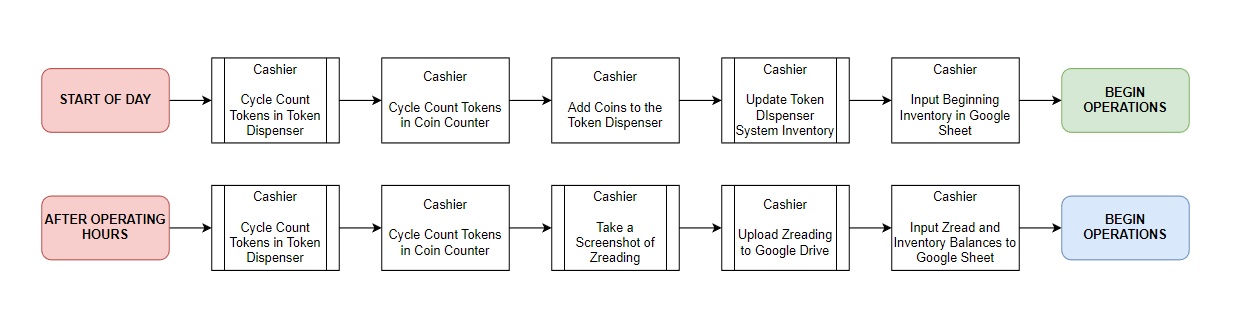
- Cashiers will record the starting token inventory every Start of Day, and ending token inventory every End of Day.
- Cashiers will take a screenshot of the Daily Zreading and Upload it to the Google Drive.
- Daily Sales will be declared in the GIS system under the module: Token Dispenser Declaration.
- If there is a variance in the inventory, a reason must be provided.
- Only Cashiers may operate the machine to maintain accountability.
- Tokens must not be left inside the machine at the end of the day.
- Token Dispenser Cycle Count must be re-validated by the External Coin Counting Machine to check accuracy.
- Credit Card and Online Payment is currently disabled. It will be available in the future.
- Ensure that there are no transactions remaining before unplugging the device.
- The Sales Accounting Department will reconcile Zreading Screenshots and Google Sheet Token Dispenser Balance daily.
- The Information Systems Department may assist in troubleshooting the device, provided there is is overseen by the cashier.
Process Flow
Training Manuals
Ref | Process | C/O | Links |
| A | How to Turn On the Token Dispenser | Cashier | Manual |
| B | How to Cycle Count and Empty Tokens | Cashier | Manual |
| C | How to Add Tokens to the Token Dispenser | Cashier | Manual |
| D | How to Open the Cash Box | Cashier | Manual |
| E | How to do Daily Zread | Cashier | Manual |
| F | How Customers can Transact in Cash | Customer | Manual |
| G | How Customers can Transact in Card | Customer | TBA |
Machine Details
Troubleshooting
Issue | Cause | Solution |
| Tokens are stuck inside | Coin inventory is low and can cause small tokens to be stuck | 1. Add more inventory 2. Do a system cycle count to un-stuck the coins |
| Amount put is less / over than required | System does not provide change | 1. Cashier to put in enough money to dispense tokens 2. Return tokens to the machine 3. Return the money to the customer 4. Adjust the system inventory to add 5. Note the discrepancy in Google Sheet 6. Redo the transaction correctly |
| The Application Crashed / Closed | Overheating or overused | 1. Restart the machine 2. Restart the app. Select "Sellcoin" |
| The Machine is not turning on | Possibly unplugged or power switch is not flipped on. | 1. Check on the plug 2. Check on the power switch |
| Blue Screen | Fatal Error | 1. Report to ISD |