
The RND Menu Creation System is designed to streamline the process of developing new menu items for our establishment. This policy outlines the procedures for ingredient creation, ingredient sourcing, and menu costing. The system ensures that the menu items are carefully crafted, cost-effective, and meet the desired quality standards.
TABLE OF CONTENTS
Roles and Responsibilities- Accounting
- Approve final cost of menu
- Upload menu code to the POS
- Chefs / Operations
- Formulates RND recipes
- Creates new ingredients and batches
- Coordinates with Purchasing department for the sourcing of new ingredients
- Conducts food tasting
- Marketing Staff
- Creates new packaging
- Coordinates with Purchasing department for the sourcing of new packaging
- Inputs item details
- Create initial SRP proposal
- Inputs menu release date and end date (if available)
- Marketing Head
- Conducts food tasting and lets the chefs know the feedback through the chatbox
- Finalizes costing of SRP created by the marketing staff
- Ensures that all item details are accurate
- Purchasing
- Sources new ingredients /packaging created by the chefs and marketing staff
- Creates new ingredients
- Links new ingredients and new packaging to the Tasteless IMFS Code
- Approve final cost of menu
- Upload menu code to the POS
- Formulates RND recipes
- Creates new ingredients and batches
- Coordinates with Purchasing department for the sourcing of new ingredients
- Conducts food tasting
- Creates new packaging
- Coordinates with Purchasing department for the sourcing of new packaging
- Inputs item details
- Create initial SRP proposal
- Inputs menu release date and end date (if available)
- Conducts food tasting and lets the chefs know the feedback through the chatbox
- Finalizes costing of SRP created by the marketing staff
- Ensures that all item details are accurate
- Sources new ingredients /packaging created by the chefs and marketing staff
- Creates new ingredients
- Links new ingredients and new packaging to the Tasteless IMFS Code
Policy- Chefs and Operations can create new RND recipes through this website: https://timfs.tasteless.com.ph/
- Chefs and Operations will be responsible for developing new menus or modifying existing ones to create innovative dishes.
The Chefs and Operations will document the recipes, techniques, and specifications for each ingredient created for future reference and consistency through the Menu Masterfile modules.
- Once a considerable amount of recipes are created, the Chefs, the Operations, and the Marketing team will coordinate to conduct a food tasting.
- All 3rd Party Tenants that will use our POS will need to have their menus uploaded in the RND Module. They can use the code: 1000003670 TENANT GENERIC INGREDIENT
During the food tasting, the Marketing team will collate all the notes and comments made about the dishes. The marketing head will input these notes in the chat box per recipe.
The marketing staff will be in charge of coordinating with the Purchasing team to find a packaging for the new dishes.
The marketing staff will be completing the item details for each recipe and provide the initial costing of the item.
The marketing head will ensure that everything done by the marketing staff is correct and approve of the costing.
Once the marketing team has finalized the menu, the purchasing department will be responsible for sourcing the required ingredients.
Costing calculations should be regularly reviewed and updated to account for fluctuations in ingredient prices and other cost factors.
The final approval of the menu item will fall under the Accounting department to ensure that the item is profitable.
After the final approval, the marketing staff will indicate the release date for the new menu item. If the menu item has a duration date for limited time promos, they will also indicate this.
The Accounting team will input the menu items in the POS on the morning of the release date.
The menu recipes created in the system is confidential information. Person/s who leaks this information to other people unrelated to the RND process will be subject to serious sanction.
Chefs will conduct a daily review of their menu to see if the costing is still competitive and within the computed margins.
All ingredients must be created in the IMFS by the Purchasing team before Accounting is able to approve the item creation.
The Chefs and Operations will document the recipes, techniques, and specifications for each ingredient created for future reference and consistency through the Menu Masterfile modules.
During the food tasting, the Marketing team will collate all the notes and comments made about the dishes. The marketing head will input these notes in the chat box per recipe.
The marketing staff will be in charge of coordinating with the Purchasing team to find a packaging for the new dishes.
The marketing staff will be completing the item details for each recipe and provide the initial costing of the item.
The marketing head will ensure that everything done by the marketing staff is correct and approve of the costing.
Once the marketing team has finalized the menu, the purchasing department will be responsible for sourcing the required ingredients.
Costing calculations should be regularly reviewed and updated to account for fluctuations in ingredient prices and other cost factors.
The final approval of the menu item will fall under the Accounting department to ensure that the item is profitable.
After the final approval, the marketing staff will indicate the release date for the new menu item. If the menu item has a duration date for limited time promos, they will also indicate this.
The Accounting team will input the menu items in the POS on the morning of the release date.
The menu recipes created in the system is confidential information. Person/s who leaks this information to other people unrelated to the RND process will be subject to serious sanction.
Chefs will conduct a daily review of their menu to see if the costing is still competitive and within the computed margins.
All ingredients must be created in the IMFS by the Purchasing team before Accounting is able to approve the item creation.
Process Flow
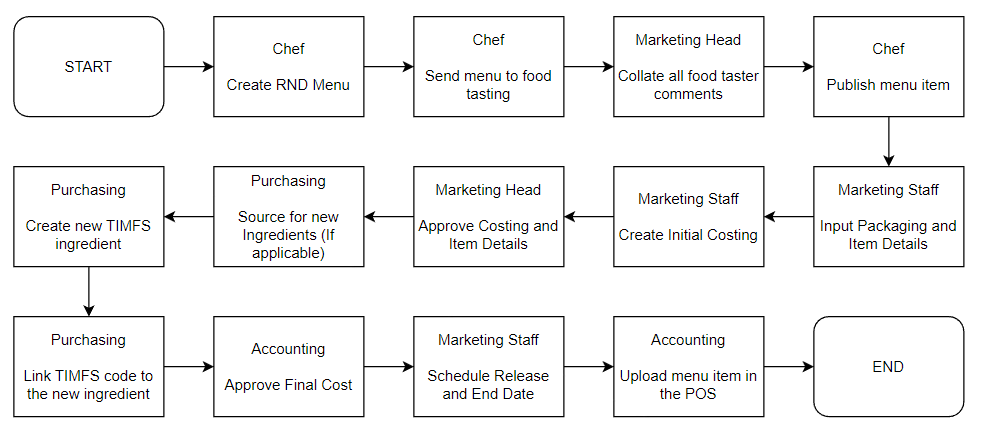
Step | Process | C/O | Links |
| 1 | Create RND Menu | Chef | Manual |
| 2 | Send Menu to Food Tasting | Chef | Manual |
| 3 | Input Comments from Food Tasting | Marketing Head | Manual |
| 4 | Publish Menu Item | Chef | Manual |
| 5 | Input Packaging, Item Details, and Costing | Marketing Associate | Manual |
| 6 | Approve Costing and Item Details | Marketing Head | Manual |
| 7 | Source New Ingredients | Purchasing | Manual |
| 8 | Approve Final Cost | Sales Accounting | Manual |
| 9 | Schedule Release Date | Marketing Associate | Manual |
| 10 | Upload Items in POS | Sales Accounting | Manual |
Other Processes
Ref | Process | C/O | Links |
| A | Create New Ingredients | Chef | Manual |
| B | Create New Packaging | Chef | Manual |
| C | Create Batching Ingredients | Chef | Manual |
| D | Create New Category | Marketing Head | Manual |
| E | Create New Subcategory | Marketing Head | Manual |
| F | Create Store List | Marketing Head | Manual |
| G | View Food Cost Summary | Chef / Marketing Associate | Manual |
| H | Create New Concept | Purchasing Head | Manual |
| I | Edit Costing | Marketing Associate | Manual |
| J | Edit Ingredients | Chef | Manual |
Menu Item Details
Item Detail | Definition | Terms / Sample |
| Item Description | Description of the item. This will be seen by all employees in sales reports and the POS | |
| Product Type | A grouping for products of similar type | UMAMI FRIED CHICKEN Item 1: Umami Fried Chicken 1pc Item 2: Umami Fried Chicken 2pc |
| Menu Type | Determines if an item is created/cooked in-store, or bought from a supplier. | Menu Build - Made in-store Retail sales - Bought ready-made (Eg. Coke in a bottle) Promo - Promo Items Others - Non-food items |
| Main Category | Main category of menu items to be used to classify similar products | Eg. Mains, Side Dish, Non-Alcoholic Beverage, Dessert |
| Sub Category | Sub category of menu items to be used to classify similar products, but needs to be more specific. Items will be grouped by subcategory in the POS | Eg. Coffee, Tea, Noodles, Chicken |
| Original Concept | Concept owner of the recipe | Eg. Bad Bird is the concept owning Umami Fried Chicken |
| Store List | List of stores that will carry the menu item. Multiple can be selected | Eg. Bad Bird The Grid, Hanamaruken Trinoma |